Datahandler script
Introduction
The data handler script is designed to facilitate the upload of data to the Radcloud upload API endpoint. This script streamlines the process of transferring data from local systems to the remote server, ensuring that the data is accurately and efficiently uploaded to the intended API endpoint.
This page demonstrates the data handler script usage with an example.
Resources
The Data handler code is available in SocSci GitLab: Data handler in GitLab
Packaged versions of the script can be downloaded with tag 'Generic' from the datahandler GitLab package registry
Implementation examples
Example projects that show how you can integrate the data handler into your project:
- JsPsych radcloud example: I want the simplest possible setup
- JsPsych radcloud example: I want to use modern JavaScript tooling
Choose your own setup
Download the datahandler script and make it part of your project There are three different ways that you can add the Datahandler to your project. Which approach you choose will depend on what your goals are.
I want the simplest possible setup
You do not need to install anything to start using the datahandler. For most experiments, this approach will be sufficient.
- Go to the following page https://www.socsci.ru.nl/tsg/radcloud-datahandler/
- Copy the link of the version you want latest or another pinned version.
- Include the following line in your index.html file pointing to the socsci hosted URL.
<script src="https://www.socsci.ru.nl/tsg/radcloud-datahandler/*.*.*/datahandler.*.*.*.js"></script>Call the function from JavaScript
datahandler.saveData(radcloudApiKey, ppn, mydata)NOTE
Example project: JsPsych radcloud example: I want the simplest possible setup
I want to download the script and host it with my experiment
This approach involves using scripts that you can download from Socsci gitlab.
- Login to Gitlab and go to the following page https://gitlab.socsci.ru.nl/tsg/radcloud-datahandler/-/packages
- Get the latest version of the datahandler by downloading the file under 'datahandler - Generic'.
- Add the script to your javascript project.
- Include the following line in your index.html file pointing to the file
<script src="datahandler.*.*.*.js"></script>Call the function from JavaScript
datahandler.saveData(radcloudApiKey, ppn, mydata)NOTE
Example project: JsPsych radcloud example: download the script and host it with my experiment
I want to use modern JavaScript tooling
Tooling like npm and import statements. You can install the datahandler from socsci gitlab package registry. This approach allows you to integrate the datahandler into your favorite JavaScript frameworks.
echo @tsg:registry=https://gitlab.socsci.ru.nl/api/v4/projects/2989/packages/npm/ >> .npmrc
npm i @tsg/datahandler
Which installs the latest version of the datahandler. Follow up by adding the following import to your ES code.
import {saveData} from '@tsg/datahandler'
saveData(radcloudApiKey, ppn,  mydata)
NOTE
Example project: JsPsych radcloud example: I want to use modern JavaScript tooling
Save Data Parameters
The datahandler script accepts four parameters.
- radcloudApiKey as a string
- ppn as a string
- mydata as a JSON object
- saveLocally as a boolean. Optional with a default of false
datahandler.saveData(radcloudApiKey, ppn, mydata, saveLocally)api_key: String containing the api key from your Radcloud experiment.
ppn: The participant number as a string. You can supply a label or a number in string format. The ppn parameter exists for backwards compatibility. It will use it to save to your browsers local storage as a safeguard. If there is a ppn as parameter but not in the data object add it to the data object. If you don't supply a PPN, the save will continue and data will be added to your experiment under participant 0.
data: The JavaScript object containing the data. Example JSON object.
let mydata = {
    "data": {
        "id": "801744",
        "experiment_id": "1176",
        "number": 2,
        "responseTime": null,
        "buttonResponse": null,
        "buttonPressed": 2,
        "stimulus": "stimuli/image/unlock.jpg"
    }
}
The datahandler will create the resulting request to Radcloud and handle clientside error handling. The following call:
datahandler.saveData("<Radcloud Experiment API key>", "29", mydata)It will send a POST request to the API endpoint with the appropriate requestbody and will be sent as:
{
    "api_key": "<Radcloud Experiment API key>",
    "data": {
        "id": "801744",
        "experiment_id": "1176",
        "ppn": "29",
        "number": 2,
        "responseTime": null,
        "buttonResponse": null,
        "buttonPressed": 2,
        "stimulus": "stimuli/image/unlock.jpg"
    }
}
saveLocally parameter
The primary benefit of using localStorage for temporary saving is to provide a client-side safeguard against data loss in case the radcloud service would not be available.
However, browsers impose a storage quota on localStorage for each website's origin (protocol + domain + port) to prevent any single site from consuming excessive disk space.
The behavior of localStorage changes significantly when a user is in a private browsing (Incognito/InPrivate) mode, and this often leads to a stricter quota, sometimes resulting in no storage at all
Default Behavior (No Local Save)
saveData("your_api_key_123", "99001", {
  experiment: "TaskA",
  response_time: 1500,
  score: 10
});
Explicitly Disabling Local Save
// Explicitly tells the function NOT to save data locally.
saveData(
  "your_api_key_456",
  "99002",
  {
    experiment: "TaskB",
    response_time: 2100,
    score: 15
  },
  false // <- saveLocally set to false
);
Enabling Local Save
// Saves data to the remote API AND to localStorage.
saveData(
  "your_api_key_789",
  "99003",
  {
    experiment: "TaskC",
    response_time: 1800,
    score: 12
  },
  true // <- saveLocally set to true
);
Response
A successful call to the upload endpoint will return the following response. It means your task is scheduled and will be processed soon. 
Handling the response in your code
datahandler.saveData(radcloudApiKey, mydata.ppn,  mydata)
    .then(response => {
        if (!response.ok)  {
            message = `Warning: failed saving data (${response.message})`
        }
    })
JsPsych radcloud example
Git checkout project JsPsych radcloud example
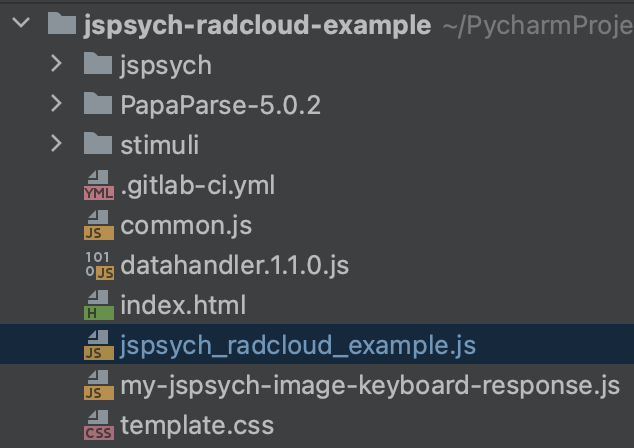
The repository project contains a JsPsych web experiment example that implements the datahandler script for posting sending data to the Radcloud API. This project contains a build of the datahandler.<version>.js file.
Versions of the datahandler script can be downloaded from socsci gitlab package registry.
Add it to your project by including <script src="datahandler.*.*.*.js"></script> in the head of your index.html file.
File index.html
<head>
	<title>Facial expressions</title>
	<meta charset="UTF-8">
    <script src="jspsych/jspsych.js"></script>
	...
    ...
	<script src="datahandler.*.*.*.js"></script>
	<script src="jspsych_radcloud_example.js"></script>

	<link href="jspsych/jspsych.css" rel="stylesheet" type="text/css">
	<link href="template.css" rel="stylesheet" type="text/css">
</head>

</html>
File jspsych_radcloud_example.js
This script calls the saveData function in the datahandler to do a POST request to the radcloud API using the API key that is added to the startExperiment function.
The API key that you'll use here is linked to a Radcloud experiment that has to exist in Radcloud. Change the API key to link to one of your experiments created in Radcloud.
If you have not created an experiment in Radcloud, please follow the next steps to create an experiment and copy its API key:
Snippet
function process_data(data) {
    mydata = {}
    mydata.ppn = ppn
    mydata.number = trialNumber
    // should be response time
    mydata.responseTime = data.rt // response time
    mydata.buttonResponse = data.key_press
    if (jsPsych.pluginAPI.compareKeys(data.key_press, 'm')) {
        mydata.buttonPressed = 1
    } else if(jsPsych.pluginAPI.compareKeys(data.key_press, 'x')) { // 'z' 90
        mydata.buttonPressed = 0
    } else if(jsPsych.pluginAPI.compareKeys(data.key_press, 'Escape')) {
        mydata.buttonPressed = 2 // "wrong or no key"
        alert("Escape key pressed, aborting this sequence")
        jsPsych.endCurrentTimeline()
    } else {
        mydata.buttonPressed = 2 // "wrong or no key"
    }
    mydata.stimulus = data.stimulus

    if (radcloudApiKey != "" && typeof radcloudApiKey != "undefined") {
       datahandler.saveData(radcloudApiKey, mydata.ppn,  mydata)
          .then(response => {
              if (!response.ok)  {
                  message = `Warning: failed saving data (${response.message})`
              }
          }...
}
Migrating from Radcloud-mini
- Create a new experiment in Radcloud.
- Copy the new experiment API key into your script.
- Add the latest datahandler script to your experiment codebase.
- Add
<script src="datahandler.*.*.*.js"></script>to index.html - Modify the calls from
saveData(intodatahandler.savedata(.
- Add
- Check the response handling and check for response.message != "success", because the message has changed. It is better to check on the boolean value response.ok.
WARNING
Data migration from radcloud-mini to radcloud is not supported.
Support
If you have any questions, suggestions, or feedback, please feel free to reach out to us via email at tsg@ru.nl. We'd love to hear from you and are always open to improving this project based on your input.